Autonomous Vehicle Fleet API
Integrate your autonomous vehicle fleet with Park Graph's parking infrastructure. Book spaces, receive gate codes, and manage fleet parking programmatically.
Why Park Graph for AV Fleets?
Every session response includes machine-readable gate codes, space assignments, and lane guidance — no human interpretation needed.
Track all sessions by fleet_id. Consolidated billing and analytics across your entire fleet.
Park Graph Certified lots guarantee real-time availability data, ADA compliance, and verified property ownership.
Query live occupancy data to route vehicles to lots with confirmed open spaces — no wasted trips.
AV Endpoints
/api/v1/sessionsCreate a parking session with AV metadata/api/v1/sessions?fleet_id={fleet_id}List sessions filtered by fleet/api/v1/lots/search?lat={lat}&lng={lng}Search lots near coordinates (returns AV-compatible lots)Creating an AV Session
To book a parking space for an autonomous vehicle, set autonomous: true and include your fleet_id. The response contains structured entry instructions the vehicle can parse directly.
Request
curl -X POST https://api.parkgraph.com/api/v1/sessions \
  -H "Authorization: Bearer pk_live_..." \
  -H "Content-Type: application/json" \
  -d '{
    "lot_id": "uuid-of-lot",
    "plate": "AV-1234",
    "vehicle": {
      "autonomous": true,
      "fleet_id": "fleet_waymo_sf",
      "vin": "1HGCM826X4A004352"
    }
  }'
Response
{
  "session": {
    "id": "sess_01HXYZ...",
    "session_code": "sess_01HXYZ...",
    "short_code": "SESS01HX",
    "lot_id": "uuid-of-lot",
    "status": "active",
    "vehicle": {
      "autonomous": true,
      "fleet_id": "fleet_waymo_sf",
      "vin": "1HGCM826X4A004352"
    },
    "rate": 3.50,
    "rate_unit": "hour",
    "estimated_amount": 7.00,
    "entry_instructions": {
      "gate_code": null,
      "assigned_space": null,
      "entry_lane": null,
      "exit_procedure": "Automatic via plate recognition",
      "notes": "AV spaces available — follow lot signage for designated autonomous vehicle areas"
    }
  }
}
AV-Specific Fields
| Field | Type | Description |
|---|---|---|
| vehicle.autonomous | boolean | Set to true for autonomous vehicle sessions |
| vehicle.fleet_id | string | Your fleet identifier for billing and analytics |
| vehicle.vin | string | Vehicle identification number for tracking |
| entry_instructions | object | Machine-readable entry details (gate code, space, lane) |
| entry_instructions.gate_code | string | null | Gate access code if applicable |
| entry_instructions.assigned_space | string | null | Assigned parking space identifier |
| entry_instructions.entry_lane | string | null | Recommended entry lane for AV vehicles |
Fleet Onboarding
Request Fleet API Access
Create a fleet-scoped API key in your developer dashboard. Set a fleet_id when creating the key — all sessions created with that key will automatically be tagged with your fleet identity.
Register Your Fleet ID
Include a unique fleet_id (e.g., "fleet_waymo_sf") in all session requests. Fleet IDs are tracked for billing and analytics.
Search Compatible Lots
Use the lot search endpoint to find certified lots that support AV entry. Look for lots with automated gate access.
Create AV Sessions
POST to /api/v1/sessions with autonomous: true. The response includes structured entry_instructions your vehicle can parse.
Handle Entry Instructions
Parse the entry_instructions object for gate codes, assigned spaces, and entry lane guidance. These are lot-specific.
Rate Limits & Billing
Fleet API keys use the same rate limits as standard keys (60 requests/minute by default). Contact us for higher limits.
All sessions created with a fleet_id are tracked together for consolidated fleet billing. Fleet billing reports are available via the dashboard or API.
AV sessions follow standard pricing rules set by the lot owner. Automated AV-specific pricing tiers are on our roadmap.
Security model
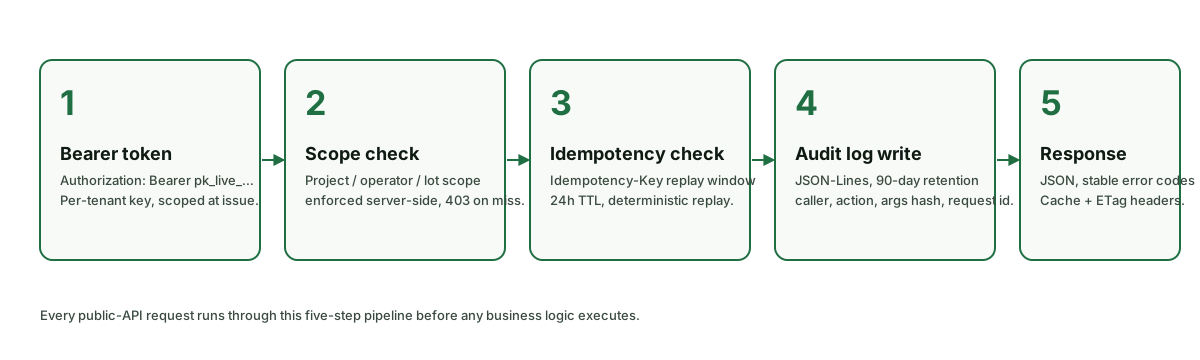
The Park Graph AV-fleet API sits behind the same security perimeter as the dashboard and the public website. The notes below summarise the controls that apply to every AV-fleet API request; a deeper write-up lives in the developer changelog.
Authentication
Every authenticated request carries an API key in the Authorization header (`Bearer pk_live_…`). Keys are issued per project from /dashboard/api-keys. Rotation is an HTTP DELETE + re-create in the dashboard; old keys are revoked immediately. Live and sandbox keys use the `pk_live_` and `pk_test_` prefixes so they cannot be confused in code review.
Transport security
TLS 1.3 with HSTS preloaded on every host (parkgraph.com, *.parkgraph.com). Plaintext requests are rejected at the edge with HTTP 426. Certificates are issued through the public Let's Encrypt CA and pinned in the CT logs.
Payment handling
Card data is tokenised inside Stripe Elements on the driver's device — Park Graph never observes raw PANs and is therefore SAQ-A scope. Sessions reference Stripe PaymentIntents by id only; webhooks are signed by Stripe using HMAC-SHA256 and verified server-side before any state change.
Data retention
Driver email addresses and license plates are retained for the lifetime of the operator's relationship with Park Graph (or 30 days after a verified delete request, whichever comes first). Search-only requests with no booking outcome are anonymised after 24 hours. Aggregated occupancy data has no personal identifiers and is retained indefinitely.
Audit trail
Every write — session create, end, extend, refund, rate change, agent registration — appends an immutable row to the audit_log table with actor type, actor id, and the diff. The log is exposed to operators through the dashboard activity feed and via a per-lot CSV export. Deletes are tombstoned, not hard-removed.
Rate limits
Limits are enforced per API key (or per IP for unauthenticated reads) using a rolling token bucket. Every response carries X-RateLimit-Limit, X-RateLimit-Remaining, and X-RateLimit-Reset headers; 429 responses additionally carry Retry-After. Bursts above the per-minute budget should be backed off with jitter — the official SDK does this automatically.
| Scope | Budget | Window |
|---|---|---|
| Per-action AI-agent calls (search, availability, rates) | 240 requests | per API key per minute |
| Agent-driven session creation | 60 requests | per API key per minute |
| Per-end-user agent fan-out (operator opt-in) | 20 requests | per end-user identifier per minute |
| Sandbox AI-agent calls | 30 requests | per key per minute |
Need a higher ceiling? Email developers@parkgraph.com with your projected throughput and we will lift the burst budget on a per-key basis.
Error codes
Every error response uses the same envelope: { "error": { "code": "…", "message": "…", "request_id": "req_…" } }. The HTTP status indicates the broad class; the code field disambiguates within a class. Surface the request_id to your support team — we can look up the full server-side trace by id alone.
| Code | HTTP status | Meaning |
|---|---|---|
| BAD_REQUEST | 400 | Required parameter missing or out of range. Response body lists the offending field. |
| UNAUTHORIZED | 401 | Missing or malformed Authorization header. Send `Authorization: Bearer pk_live_…`. |
| FORBIDDEN | 403 | API key is valid but the plan does not include this scope (e.g. agent or intelligence endpoints on Starter). |
| NOT_FOUND | 404 | Lot, session, or webhook id does not exist or has been deleted. |
| CONFLICT | 409 | Idempotent retry of a non-terminal session, or attempt to end an already-completed session. |
| RATE_LIMITED | 429 | Per-key burst budget exceeded. Inspect `Retry-After` and back off. |
| PAYLOAD_TOO_LARGE | 413 | Webhook delivery body or batch upload exceeds 1 MB. |
| INTERNAL | 500 | Unexpected server error. Park Graph automatically opens an incident and retries idempotent writes. |
| BAD_GATEWAY | 502 | Upstream payment processor returned an error. Safe to retry with the same idempotency key. |
Architecture
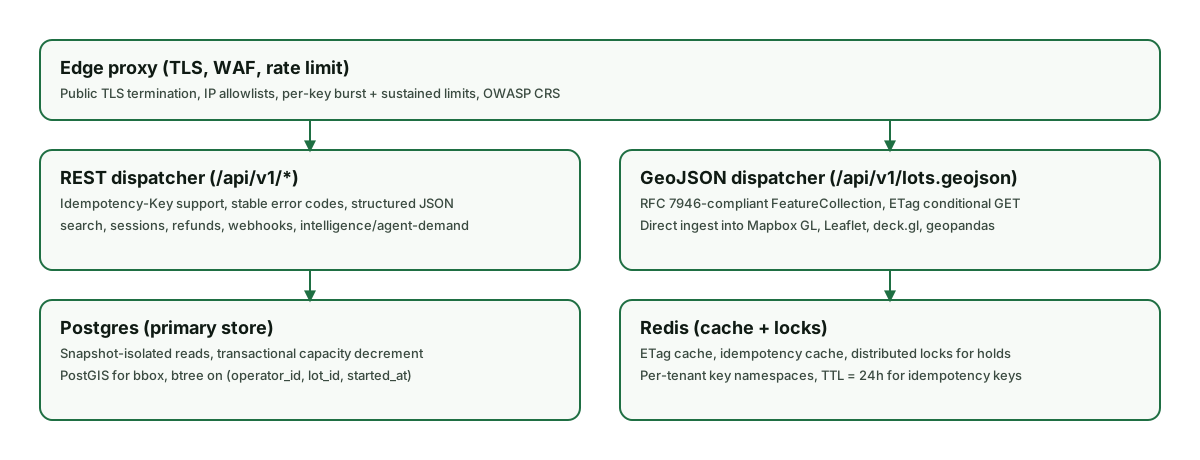
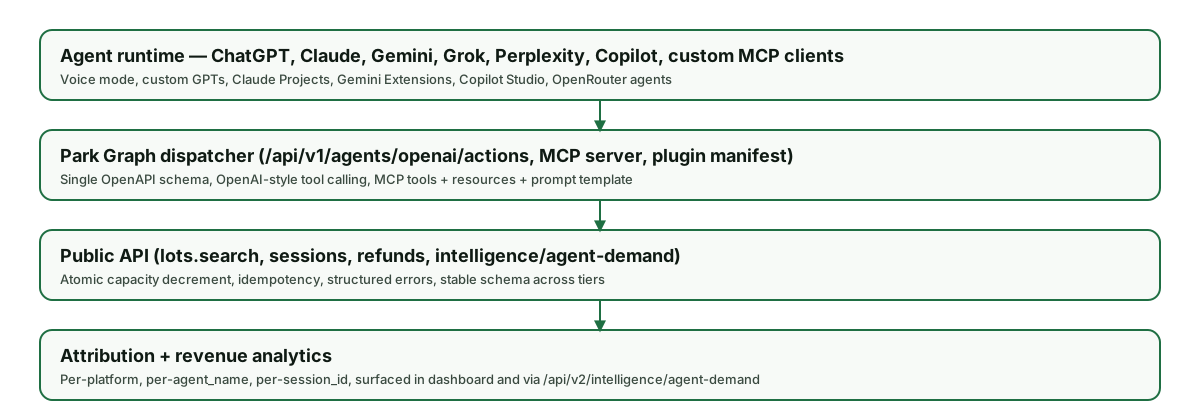
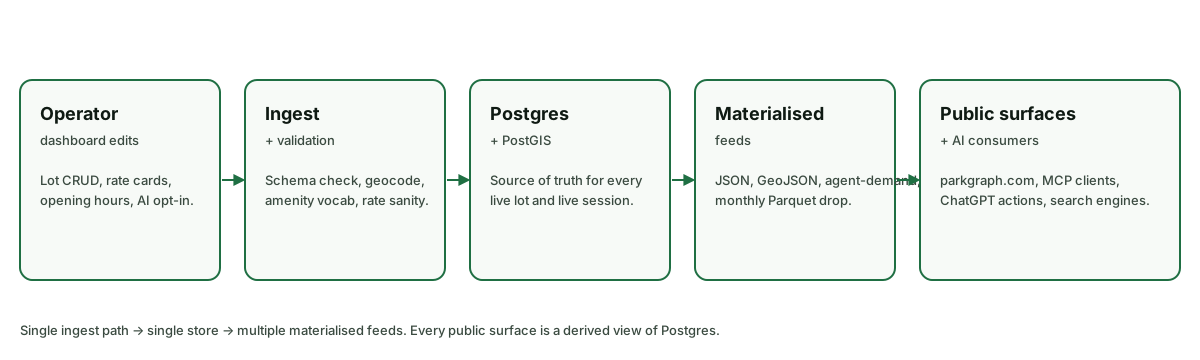
Every Park Graph request — whether it arrives from the AV-fleet API, the dashboard, the QR-driven mobile checkout, or an agent — runs through the same Next.js Edge front door, hits the same Postgres-backed core, and shares the same audit log and webhook fan-out. There is no divergent code path between "agent traffic" and "human traffic": anything an agent can do, a human can do, and vice versa.
Sandbox & getting help
Every operator gets a sandbox key prefixed with pk_test_. Sandbox traffic uses Stripe test mode, synthetic lots, and never charges a real card. Spin one up at /developers/sandbox, then point your client at https://parkgraph.com/api/v1 exactly as you would in production.
For integration help, reach the developer team at developers@parkgraph.com or open an issue on the public GitHub org. Status and incident history live at /developers/changelog; subscribe to the JSON feed for machine-readable updates.